Screen Time Not Working? Kid Found a Way Around It
Why the limits stop holding
This is one of the most reported frustrations among parents who already tried to set something up. An iPhone parent describes exactly the failure mode, after what should have been a routine update:
"The settings are just gone (across all devices) and the kids get unfettered access to everything again." Reported by a parent on Reddit, after an iOS update.
Deletion is the other common route around a limit. A Kidslox reviewer reports their son deleted the monitoring app entirely, and that their refund request was refused. A Qustodio reviewer's verdict, in their own words, after paying: "This app doesn't work. Waste of money."
Neither of these is really an app failure. Both point at the same missing step: nothing stopped app deletion in the first place, and nobody tested afterward that the block actually held on the child's own device rather than trusting the settings screen's word for it.
What's already been spent chasing this
Money and time both go into this before most parents find the actual fix:
| What was tried | Reported cost | What it actually fixed |
|---|---|---|
| A paid monitoring app (various) | $49–105/year | Often nothing, per the reviews above: the same underlying settings gap remains |
| A second, different paid app after the first failed | Another $49–105/year | Same failure mode repeats if the two steps below are still skipped |
| The First Phone Kit | $27, once | The exact setting that stops deletion, plus the test that proves it. Both named, both sourced |
Prices and reports as available on 2026-09-09; setup-time and satisfaction figures are individual reviewer reports, not averages.
The pattern in every account above is the same: the money went to a new app, not to the two specific steps that would have made the original one hold. Buying a second subscription without those two steps tends to reproduce the same failure.
What you'll have when you're done
- App deletion blocked under Content & Privacy Restrictions, so the child can't simply remove whatever you installed.
- Proof the block actually holds: a test you run yourself on the child's own device, the same way vendors test their own products.
- A monthly ten-minute recheck habit with a date in your calendar, because updates and resets can quietly clear settings.
- A written, named list of what still can't be fully closed, so a workaround that does slip through isn't a surprise.
This is typically the shortest part of the full setup: the two steps below take a few minutes each once you know where they are.
The two-step fix, and the test
TL;DR
- Block app deletion: Content & Privacy Restrictions → iTunes & App Store Purchases → Deleting Apps → Don't Allow (iPhone).
- Then test the block on the child's own device: don't trust the settings screen's word for it.
- Put a monthly recheck on the calendar: OS updates and device resets can silently clear configuration.
- Name what still can't be fully closed, instead of promising a setting is bulletproof.
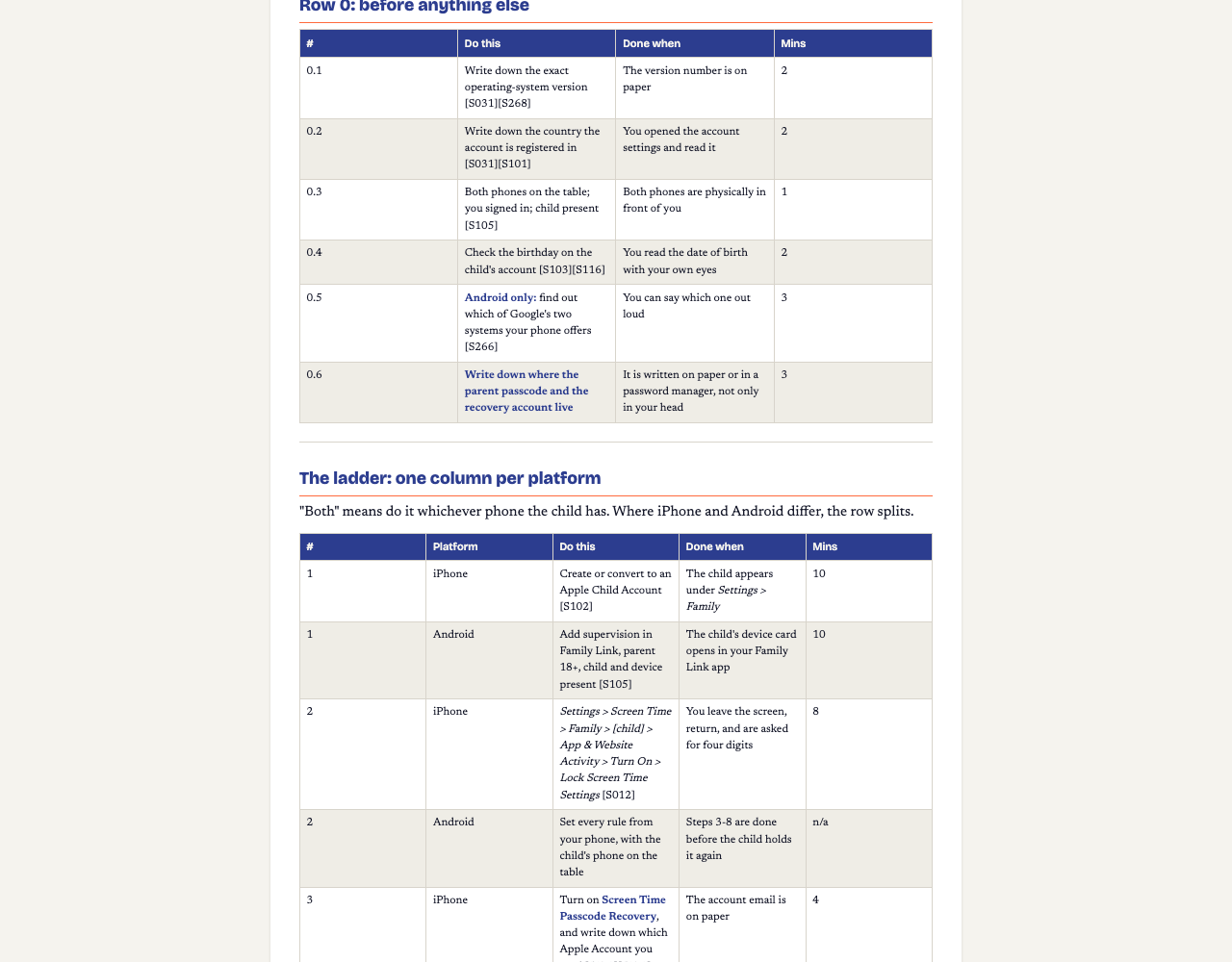
- Block app deletion first. On iPhone: Settings → Screen Time → Content & Privacy Restrictions → iTunes & App Store Purchases → Deleting Apps → Don't Allow. This is the single step that stops the most common workaround reported by parents of monitoring-app users.
- Lock the settings themselves. Settings → Screen Time → Family → [child] → App & Website Activity → Turn On → Lock Screen Time Settings, with a passcode the child does not know.
- On Android, achieve the same result by sequence rather than one switch: set every rule from your own phone before the child holds theirs again, then turn off Developer Options and USB debugging and check monthly that they stay off.
- Test the block on the child's own device. Vendors document this exact self-test for their own products: open a browser on the child's phone, navigate to a known block-test page, and try to load it. If it fails to load, the block is working. This is the step almost everyone skips, and it's the only way to know a setting actually holds rather than merely looks configured.
- Put a recheck date in the calendar. Because OS updates and full resets are the most commonly reported cause of settings quietly reverting, a monthly ten-minute check is the realistic fix, not a one-time setup you never revisit.
The hard part: no setting is described as unbeatable, honestly
NSPCC's Luke Savage told The Guardian: "There are limitations to parental controls. They're not perfect - children can bypass them if they're clever enough." That is not a reason to skip the two steps above. It is the reason the monthly recheck exists. A list of every specific bypass in circulation is deliberately not printed here: those lists go stale fast, one dated source confirms a recent OS release closed a batch of them, and a wrong, outdated list would be worse than the honest test above.
Controls also stop at the edge of the phone itself. The NSPCC states it against its own advice: they "won't work if they use 3G, 4G or 5G, public WiFi or log onto a friend's connection". That is a limit of the mechanism, not a setting you missed.
Questions parents actually ask
Why did the settings just reset themselves?
The most reported cause is an OS update or device reset clearing the configuration, per direct parent reports. There's no single documented permanent fix from Apple for this: the working answer is a monthly recheck habit, not a one-time setup.
My kid deleted the app I installed. Now what?
The single most repeated complaint in parent reviews of paid monitoring apps. The fix is a specific setting (Content & Privacy Restrictions → iTunes & App Store Purchases → Deleting Apps → Don't Allow), done before handing the phone back, not a different or pricier app.
How do I know the block is actually working, not just switched on?
Test it the way vendors test their own products: on the child's device, open a browser, go to a known block-test page, and try to load it. If it fails to load, the block holds. A settings screen reading "Enabled" is not proof by itself.
Is this a subscription?
No. The First Phone Kit is a one-time $27 purchase, not a subscription, and it includes the monthly recheck habit as a written step rather than an ongoing paid service.
What does the kit NOT cover?
Named honestly: an undated, changing list of specific bypasses is deliberately not printed (it would go stale); how to find an undisclosed second phone in the house isn't a settings problem the kit can solve; and retrofitting all of this onto a phone that's already been open, unrestricted, for months has sourced settings but no sourced script for that conversation.
Price, and what this doesn't cover
One-time purchase. No subscription, no recurring charge.
The First Phone Kit: the settings, the test, and the monthly habit that keeps it holding.
Sources (dated, checked 2026-09-09)
- Apple, Screen Time overview and paths: support.apple.com/en-us/108806 (updated 2026-07-01)
- Apple, Content & Privacy Restrictions: support.apple.com/en-us/105121 (updated 2026-04-21)
- Google, supervision setup requirements: support.google.com/families/answer/9055704
- Bark, self-test that blocking is working: support.bark.us: testing that blocking works (updated 2026-06-13)
- Bark, stopping app deletion on iOS: support.bark.us: stop app deletion (updated 2026-05-06)
- Bitdefender, Android Family Link bypass and the Developer-Options countermeasure: bitdefender.com/hotforsecurity (2025-10-09, updated 2026-04-06)
- Bark, official pricing: support.bark.us/en/articles/13460996-pricing
- Qustodio, free vs. premium tiers: qustodio.com: free vs. premium
- Reddit r/ios, "settings just gone" thread: reddit.com/r/ios (2022-09-28)
- Google Play, Kidslox reviews (buyer language only): play.google.com: Kidslox
- Trustpilot, Qustodio reviews (buyer language only): trustpilot.com/review/www.qustodio.com
- NSPCC's Luke Savage, via The Guardian, on the limits of parental controls: theguardian.com (2025-03-16)
- NSPCC, parental controls and where they stop working: nspcc.org.uk: parental controls
- ConnectSafely, parental controls across platforms: connectsafely.org/controls (2025-07-20)
- FCC, first-phone consumer guidance: fcc.gov/consumers/guides/your-kids-first-phone
- FTC, children's privacy and COPPA: ftc.gov: children's privacy (updated 2025-09-03)
- ICO, Children's Code: ico.org.uk: Children's Code (2020)