Parental Controls When One Kid Has an iPhone and the Other Has Android
Why this is a real, separate problem
Most parenting content assumes one platform. A household with an iPhone kid and an Android kid finds out fast that advice written for one doesn't transfer to the other. The clearest evidence of this gap is what the closest paid competitor says about itself. A $27 iPhone-only "Masterclass" answers the question directly, unprompted, on its own sales page:
"My child has an Android. Will this work? No. Every setting and screenshot in the Masterclass is from an iPhone running iOS." From the product's own FAQ.
That is an honest answer from a competitor, and it is also the exact gap this page exists to close. Across ten direct and adjacent listings we reviewed on two marketplaces, plus that dedicated iPhone-only course, none walk a parent through both iOS and Android in one place, screen by screen, version- and region-flagged.
The two systems are not cosmetically different. They're built and documented by two different companies, with different terminology, different menus, and different edge cases. Apple's own instructions are correct but version-gated: one exception-request flow does not exist before iOS 26, and Apple states plainly, "Age varies by country or region." Google, separately, now documents two distinct control systems for Android rather than one.
What buying twice, or guessing, costs
The obvious workaround (buy one guide per platform, or pay for a cross-platform app) has its own price tag:
| Option | Price | What it actually covers |
|---|---|---|
| iPhone-only "Masterclass" (closest competitor) | $27 | iOS only, by the vendor's own admission: a second purchase needed for the Android child |
| Bark (cross-platform, subscription) | $5–14/month ($49–99/year) | A monitoring dashboard layered on top of, not instead of, each platform's own settings |
| Qustodio (cross-platform, subscription) | $59.95–104.95/year | Same layering: a dashboard on top of each platform's own settings |
| The First Phone Kit | $27, once | Both platforms, sourced, in the same pack. No second purchase, no subscription |
Prices as listed by each vendor on 2026-09-09.
Guessing rather than buying carries its own cost: applying iPhone instructions to an Android phone, or vice versa, simply doesn't work: the menus don't exist on the other platform. That's not a hypothetical; it's the exact scenario the competitor's own FAQ was written to head off.
What you'll have when you're done
- Both children's phones set up screen by screen (the iPhone child on iOS, the Android child on Android), each with a parent passcode the child does not have.
- Proof the limits actually bind on both devices: a test you run yourself on each child's own phone, not a settings screen that says it should work.
- One shared family agreement covering both children, filled in and signed together: UK and US versions.
- A written, named list of what this plan does not cover on either platform, so nothing is a surprise later.
Budget one evening per platform, two evenings total for a genuinely mixed household, not one longer one. The pre-checks and the family agreement are shared; the screen-by-screen setup is separate work on each device.
The sequence, both platforms
TL;DR
- Do the shared pre-checks once: OS version, account country, birthday on file, both phones on the table.
- Run the iPhone sequence in full for the iPhone child; then run the separate Android sequence for the Android child.
- The two platforms use different terms for similar ideas: Screen Time vs. Family Link, Content & Privacy Restrictions vs. App limits.
- Test both on each child's own device: a working iPhone block proves nothing about the Android phone.
- Sign one family agreement covering both children together.
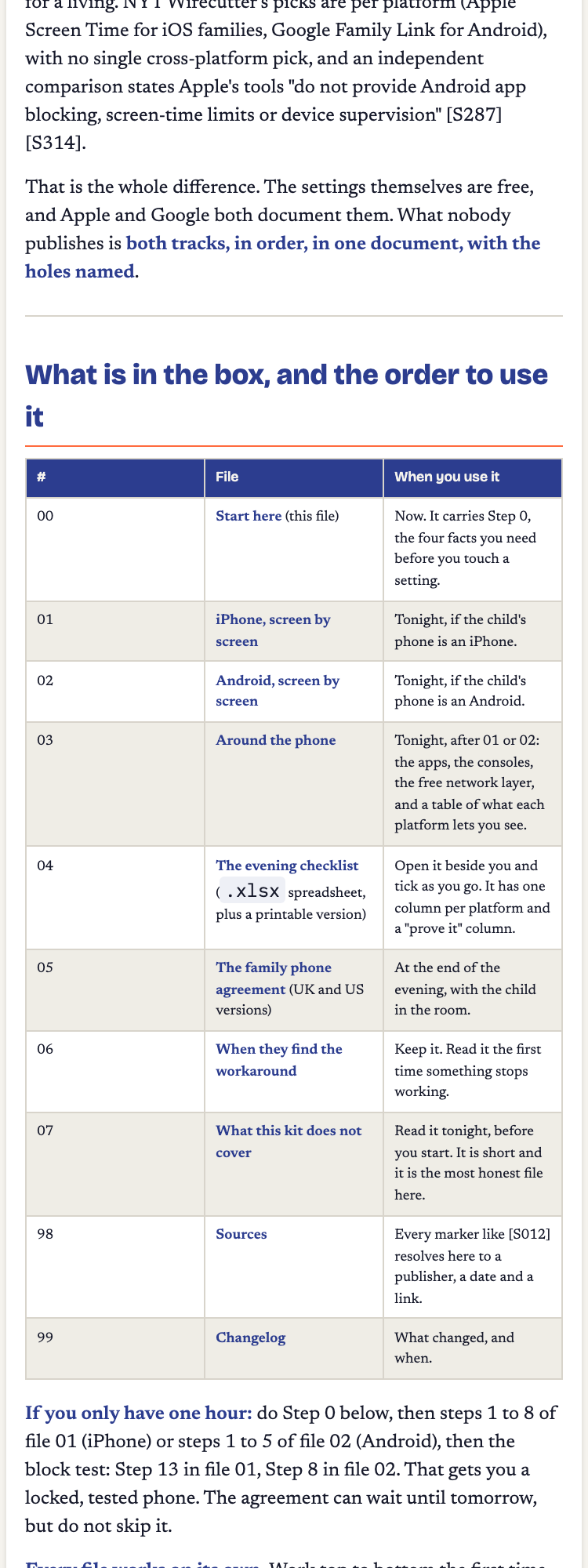
iPhone track
- Write down the exact iOS version and account country. One exception-request screen exists only on iOS 26 / iPadOS 26. An older iOS may not show it.
- Create or convert to an Apple Child Account (under 13).
- Set your parent passcode first: Settings → Screen Time → Family → [child] → App & Website Activity → Turn On → Lock Screen Time Settings.
- Turn on Ask to Buy for purchase approval.
- Set daily limit, weekly schedule, and per-app limits.
- Set Content & Privacy Restrictions, including blocking app deletion (the step that stops the single most common workaround).
- Configure each app the child actually uses individually.
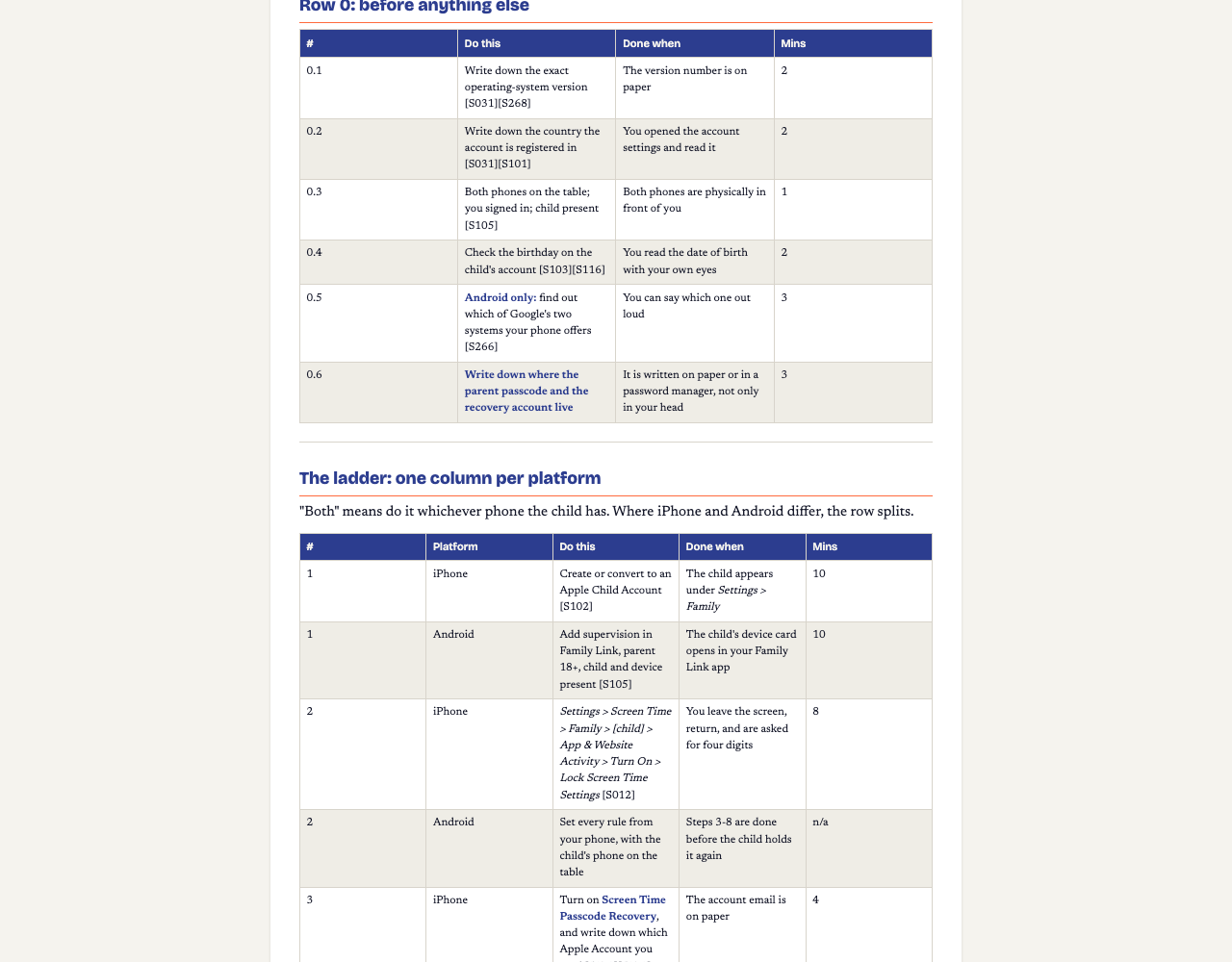
Android track
- Write down the exact Android version and account country.
- Set up a Family Link-supervised account: parent 18+, child and device both present during setup.
- Set your parent controls first, before handing the phone back.
- Turn on app-approval so purchases and downloads need parent sign-off.
- Set App limits and screen time per Google's documented controls.
- Turn off Developer Options and USB debugging, and check monthly that they stay off: the closest thing Android has to iPhone's single settings-lock switch, achieved by sequence rather than one toggle.
- Configure each app the child actually uses individually.
The hard part: the two platforms don't map onto each other cleanly
It's tempting to assume "whatever iPhone calls it, Android has an equivalent", but that isn't always true, and pretending otherwise is worse than naming the gap. What Android's App limits actually do, compared with the equivalent Apple feature, is something no source we could verify settles cleanly: Google documents App limits, but a direct side-by-side comparison against Apple's system isn't something either company publishes, and a rival vendor's claim on the subject is contradicted by Google's own documentation.
The honest approach, and the one this kit takes: set the limit on each platform as that platform documents it, then test it on that specific device. Don't assume parity you haven't verified.
Questions parents actually ask
Why don't more guides just cover both platforms?
Because it's two separate jobs, not one. The closest $27 competitor says so on its own sales page: "My child has an Android. Will this work? No. Every setting and screenshot in the Masterclass is from an iPhone running iOS." Writing both properly means sourcing both properly, screen by screen.
Can I just use one app that claims to work on both?
You can, but the free settings Apple and Google each ship do most of the same job at zero cost, and the two platforms don't expose identical controls. How Android's App limits compare with Apple's equivalent is a genuine gap this kit names rather than guesses at.
Do I have to do the whole evening twice?
Effectively yes: budget one evening per platform, not one evening total. The shared parts (the family agreement, the four pre-checks) are done once; the screen-by-screen setup is genuinely separate work on each device.
Is this a subscription?
No. The First Phone Kit is a one-time $27 purchase covering both platforms in the same pack, not a subscription and not two separate purchases.
What does the kit NOT cover?
Named honestly: a side-by-side comparison of Android App limits versus Apple's equivalent (no qualifying source settles it), a printable list of bypasses (undated lists go stale), WhatsApp's parental controls specifically, and a dated phased-access schedule. Each is a genuine sourcing gap, not a hidden limitation.
Price, and what this doesn't cover
One-time purchase, both platforms included. No subscription, no second purchase for the second child.
The First Phone Kit: iPhone and Android, both covered, tested, sourced.
Sources (dated, checked 2026-09-09)
- Competitor iPhone-only course, own FAQ ("My child has an Android. Will this work? No."): familyitguy.com/iphone-masterclass
- Apple, Screen Time overview and paths: support.apple.com/en-us/108806 (updated 2026-07-01)
- Apple, Content & Privacy Restrictions and version/region notes: support.apple.com/en-us/105121 (updated 2026-04-21)
- Apple, Ask to Buy purchase approval: support.apple.com/en-us/105055 (updated 2026-07-01)
- Google, Family Link setup and paths: support.google.com/families/answer/7101025
- Google, supervision setup requirements: support.google.com/families/answer/9055704
- Bark, official pricing: support.bark.us/en/articles/13460996-pricing
- Qustodio, free vs. premium tiers: qustodio.com: free vs. premium
- Trustpilot, Qustodio reviews (buyer language only): trustpilot.com/review/www.qustodio.com
- Google, on-device controls (a second, separate Android system): support.google.com/android/answer/16766047
- Bitdefender, Android Family Link bypass and the Developer-Options countermeasure: bitdefender.com/hotforsecurity (2025-10-09, updated 2026-04-06)
- FCC, first-phone consumer guidance: fcc.gov/consumers/guides/your-kids-first-phone
- FTC, children's privacy and COPPA: ftc.gov: children's privacy (updated 2025-09-03)
- ICO, Children's Code: ico.org.uk: Children's Code (2020)
- UK Government, Online Safety Act collection: gov.uk/government/collections/online-safety-act