Parental control app not working? Check these two settings before you ask for a refund
Why the refund request is usually premature
Read the one-star reviews of any paid parental-control app and the same story repeats. A Kidslox reviewer, in their own words:
"Then after a few months I realised that my son could delete it… Now fed up and requested a refund which has been rejected." [S154]
A Qustodio reviewer on Trustpilot: "This app doesn't work. Waste of money." [S029] An iPhone parent on Reddit, about Apple's own Screen Time: "Neither of those limits are restricting her at all." [S290] Another, after an iOS update: "The settings are just gone (across all devices) and the kids get unfettered access to everything again." [S185]
Most of these are not app failures. Every monitoring app, paid or free, sits on top of the same Apple and Google settings. Two of those settings decide whether anything the app does survives contact with the child, and no app can set them for you. If they were never set, the app was never given a chance, and a different app will fail the same way.
What's already been spent on the wrong fix
| What was tried | Reported cost | What it actually fixed |
|---|---|---|
| Bark (Jr or Premium) | $49 or $99 a year, as listed on 2026-09-09 [S004] | Nothing, if deletion was never blocked: the app can be removed |
| Qustodio (Basic or Complete) | $59.95 or $104.95 a year, as listed on 2026-09-09 [S010] | Same failure mode if the two settings below are still unset |
| A second app after the first "didn't work" | Another year of subscription | Repeats the failure: the gap is under the app, not in it |
| The First Phone Kit | $27, once | The two settings named with their Apple and Google sources, plus the test that proves they hold |
Prices are the vendors' own list prices as read on 2026-09-09; reviewer reports are individual accounts, not averages.
What you'll have when you're done
- App deletion blocked on iPhone, so whatever you installed cannot be removed with a long-press [S270].
- The Screen Time settings locked behind a four-digit passcode the child does not know, with Passcode Recovery on so you cannot lock yourself out [S012][S273].
- On Android: every rule set from your own phone before the child held theirs again, and Developer Options and USB debugging confirmed off [S013][S275].
- Proof, from a test on the child's own device, that the block actually holds [S269].
- A refund request you either no longer need, or can now write with the evidence attached.
The two settings, then the test
TL;DR
- iPhone setting 1: Content & Privacy Restrictions → iTunes & App Store Purchases → Deleting Apps → Don't Allow [S270].
- iPhone setting 2: Screen Time → Family → [child] → App & Website Activity → Turn On → Lock Screen Time Settings, four digits entered twice [S012][S273].
- Android: rules set from your phone in Family Link, app approval on, then Developer Options and USB debugging off [S013][S275].
- Then test on the child's device, wait a few minutes, and test again with WiFi off [S269][S169].
iPhone
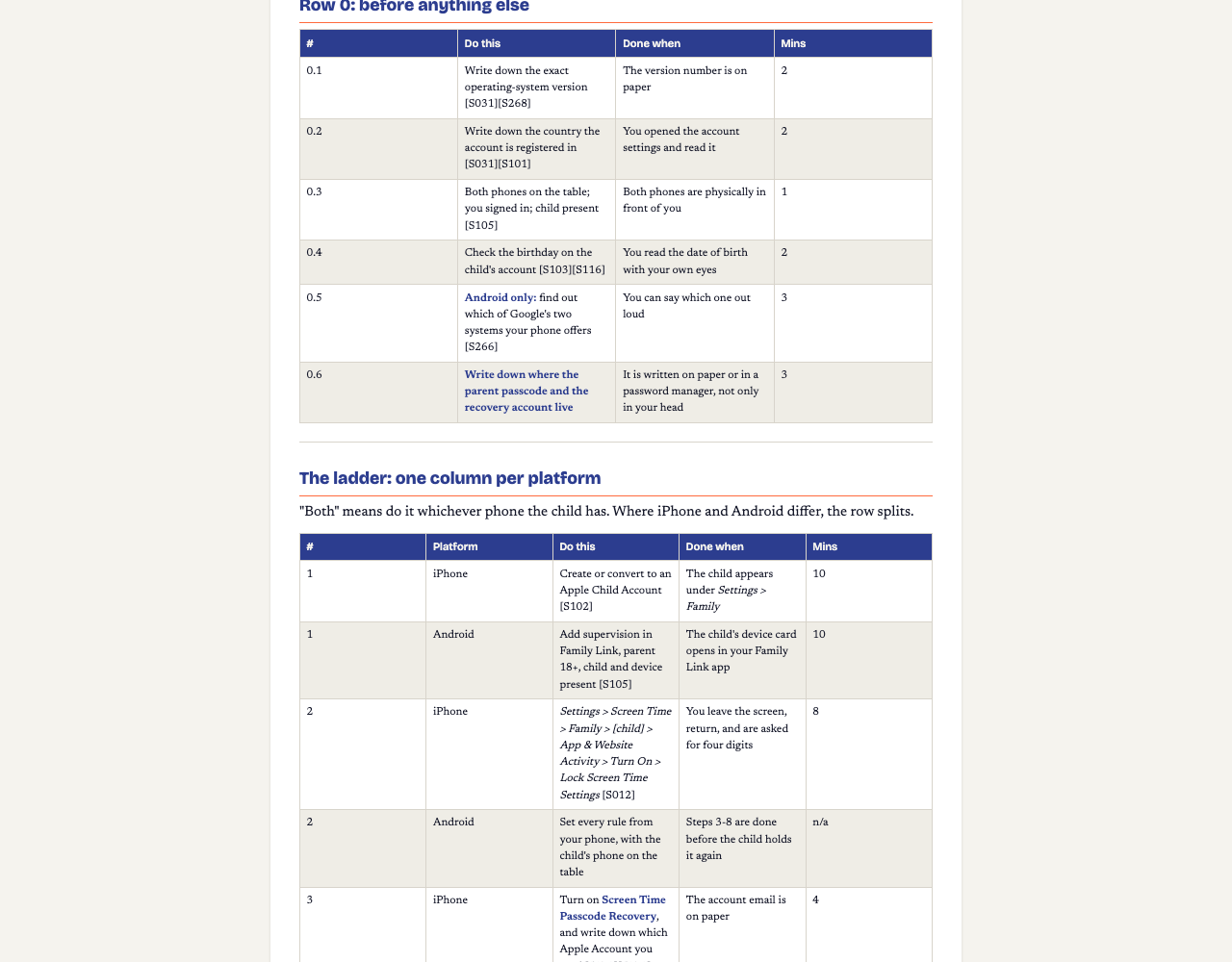
- Stop deletion. On the child's phone: Settings → Screen Time → Content & Privacy Restrictions → iTunes & App Store Purchases → Deleting Apps → Don't Allow [S270]. This is the setting the Kidslox reviewer above never had. Done when: you try to delete an app from the home screen yourself and the phone refuses.
- Lock the settings. Settings → Screen Time → Family → [child] → App & Website Activity → Turn On → Lock Screen Time Settings, then enter four digits twice [S012][S273]. Apple states this passcode "isn't the same as the passcode you use to unlock your device" [S273]. Pick digits the child cannot guess; one parent lost the evening this way: "He guessed the passcode" [S180]. Done when: you leave the Screen Time screen, come back, and are asked for the four digits.
- In the same minute, turn on Screen Time Passcode Recovery and write down which Apple Account email you used, because Apple's reset asks for "the Apple Account email address and password that you used to set up the Screen Time passcode", which may not be the one you are signed in to [S273][S272].
Android
- Set every rule from your own phone. Family Link runs on your phone, not the child's; its settings include Daily limit, Weekly schedule, App limits and Bonus time [S013][S266]. There is no single "lock the settings" switch to point you at, so the protection is sequence: configure everything, including app approval [S013], before the child holds the phone again.
- Check Developer Options and USB debugging are off, and stay off [S275]. "Developer Options" is a hidden menu meant for people building apps; "USB debugging" lets a connected computer change the phone. Add "still off?" to a monthly check.
Then test, on their phone, not yours
- On the child's device open screentime.report and tap the app you limited. If the page does not load, the block is on. Give it a few minutes after any change [S269]. (screentime.report is Bark's own public test page; the method does not depend on which tool did the blocking. Or simply open the limited app itself.)
- Turn WiFi off and run the test again on mobile data. Controls set on the device and on home broadband "won't work if they use 3G, 4G or 5G, public WiFi or log onto a friend's connection" [S169].
- If your app filters through a VPN and the test fails off WiFi, the vendor's own fix is documented: Bark's "Screen time protection has been disrupted on iOS" article says reopen the app, keep cellular data on for it, restart and wait a few minutes [S262].
The hard part: one limit the vendor names and nobody can fix
If you still want a refund after all this, here is the one case where the app genuinely cannot hold. Bark states: "Apple doesn't let you lock down the Bark Kids app VPN settings, which we use to block apps and sites" [S270]. That is the vendor, about its own product, on its own support page. No setting closes it. One other vendor suggests restricting the installation of VPN and proxy apps and auditing the installed-apps list for VPN clients and duplicate browsers [S278]; that is one vendor's recommendation, passed on as such, not an instruction we could verify.
And the general limit, from the NSPCC's Luke Savage in The Guardian: "There are limitations to parental controls. They're not perfect - children can bypass them if they're clever enough." [S283] The two settings on this page raise the cost of a workaround. They do not remove it, and no honest guide says otherwise.
Questions parents actually ask
The app says it's on. Why doesn't the limit hold?
Because a settings screen is not evidence. Parents describe exactly this: "Neither of those limits are restricting her at all" [S290]. The test is on the child's own device: open the app you limited, or Bark's public test page screentime.report; if it loads, the block is not on, whatever the screen says [S269].
My kid deleted the app. Is that the app's fault?
Mostly not. On iPhone, deletion is stopped by a phone setting the app cannot set for you: Content & Privacy Restrictions > iTunes & App Store Purchases > Deleting Apps > Don't Allow [S270]. A Kidslox reviewer whose son deleted the app had the refund refused [S154]. Set that switch first, then judge the app.
Do I need to uninstall the paid app and buy a different one?
Usually no. Bark and Qustodio sit on top of the same Apple and Google settings; the two switches on this page are what most failures come down to. If you only use Apple's or Google's own settings, the paid app is optional anyway: Communication Safety, for one, is on by default for under-18 accounts and you do not pay a subscription for it [S102][S100].
The app worked on WiFi and stopped on 4G. Why?
Controls set on the device and on home broadband "won't work if they use 3G, 4G or 5G, public WiFi or log onto a friend's connection" [S169]. For VPN-based filtering apps, Bark itself documents "Screen time protection has been disrupted on iOS" and tells parents to reopen the app, keep cellular data on for it and wait a few minutes [S262]. Re-test with WiFi off.
Is The First Phone Kit a subscription?
No. The First Phone Kit is a one-time $27 purchase. It covers both platforms, the two settings on this page, the block test, and a monthly recheck written as a step, not sold as a service.
Price, and what this doesn't cover
One-time purchase. No subscription, no recurring charge.
The First Phone Kit: both platforms, screen by screen, tested, with the signed agreement.
Sources (dated, checked 2026-09-09; markers like [S012] match the kit's own sources file)
- [S004] Bark Technologies, official pricing page, not dated; read 2026-09-09: support.bark.us/en/articles/13460996-pricing
- [S010] Qustodio, free vs premium comparison page, not dated; read 2026-09-09: www.qustodio.com/en/difference-between-qustodio-free-and-qustodio-p...
- [S012] Apple Inc., 2026-07-01: support.apple.com/en-us/108806
- [S013] Google, not dated: support.google.com/families/answer/7101025?hl=en
- [S029] Trustpilot, c. 2026: www.trustpilot.com/review/www.qustodio.com
- [S100] Apple, 2026-03-24: support.apple.com/en-us/105069
- [S102] Apple Newsroom, 2026-06-08: www.apple.com/newsroom/2026/06/apple-previews-new-child-safety-feat...
- [S154] Google Play (Kidslox listing and user reviews), read 2026-09-09: play.google.com/store/apps/details?id=com.kidslox.app&hl=en_US
- [S169] NSPCC, not dated: www.nspcc.org.uk/keeping-children-safe/online-safety/parental-contr...
- [S180] Reddit, not dated: www.reddit.com/r/Parenting/comments/1qlgntc/honest_question_is_ther...
- [S185] Reddit, not dated: www.reddit.com/r/ios/comments/xqpkju/screen_time_app_limits_keep_re...
- [S262] Bark Technologies, 2026-08-04: support.bark.us/en/articles/13461436-screen-time-protection-has-bee...
- [S266] Google, not dated: support.google.com/android/answer/16766047?hl=en
- [S269] Bark Technologies, 2026-06-13: support.bark.us/hc/en-us/articles/360056635611-How-to-test-app-and-...
- [S270] Bark Technologies, 2026-05-06: support.bark.us/hc/en-us/articles/360049964392
- [S272] Apple Inc., 2026-06-12: support.apple.com/en-us/102677
- [S273] Apple Inc., 2026-06-12: support.apple.com/en-us/126533
- [S275] Bitdefender, 2025-10-09: www.bitdefender.com/en-us/blog/hotforsecurity/family-link-bypass-an...
- [S278] Kroha Sp. z o.o., 2026-07-10: parental-control.net/en/blog/article/prevent-kids-bypassing-parenta...
- [S283] The Guardian, author Amy Fleming, 2025-03-16: www.theguardian.com/lifeandstyle/2025/mar/16/how-tech-experts-keep-...
- [S290] Reddit r/iphone, not dated: www.reddit.com/r/iphone/comments/18vc46z/screen_time_limits_and_dow...